
Complex Legal Document Automation Software
Automate Your Most Complex Legal Documents — Without Complex Programming
Simple document automation is easy. The challenge comes when your documents involve hundreds of variables, conditional logic, multiple parties, and interconnected documents.
That's where Knackly is built to excel.
Knackly trusted by more than 150+ companies across the globe


When basic document automation isn't enough
Many document automation tools work well when the workflow is simple:

Basic document automation
- Fill in a name
- Insert an address
- Choose a clause
- Generate a document
Legal drafting rarely stays that simple.

Knackly
Knackly was designed for the harder problems.
A complex legal document may need to:
- Determine which provisions apply based on dozens of previous answers
- Repeat provisions for beneficiaries or assets
- Generate different language based on relationships or roles
- Handle multiple people or entities
- Perform calculations
- Coordinate information across several related documents
What makes legal document automation complex?
Complexity isn't just about page count. A ten-page document may need advanced automation, while a 100-page document can be simpler. Legal document automation often involves multiple layers of logic.

Conditional Drafting
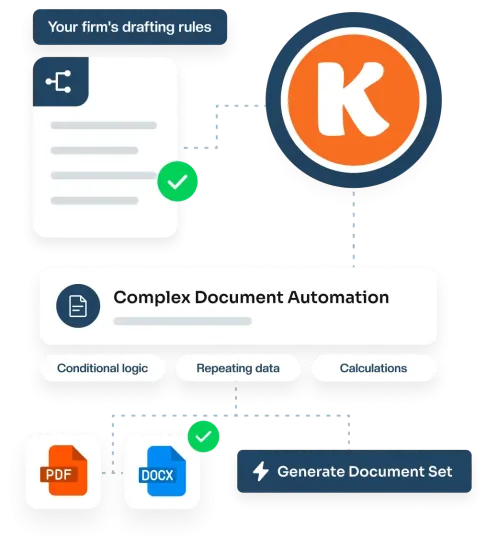
Include, exclude, or modify provisions based on interview answers, using your firm's own drafting rules.
Repeating Information
Collect beneficiaries, trustees, assets, and parties as structured lists, then use them throughout your documents.
Nested Data
Represent real relationships, like a trust's beneficiaries and their children, instead of disconnected variables.
Calculations
Build percentages, dates, ages, and allocations into the drafting to decide which language and values appear.
Multiple Related Documents
Automate the whole matter, from the primary agreement to every exhibit, notice, and supporting document.
Everything you need to automate your most complex documents
Capture info once, apply drafting logic, and generate Word and PDF documents in one workflow.
Capture information
once. Use it everywhere.
One of the biggest advantages of sophisticated document automation is eliminating duplicate data entry.
- Model a person once and assign roles, instead of separate variables for each role
- Reuse name, address, contact information, and birthdate wherever needed
- Change the underlying information once and the updated data can flow throughout the workflow

Build the logic once.
Reuse it.
Complex automation becomes difficult to maintain when the same drafting logic is recreated across dozens or hundreds of templates.
- Designed around reusable information and logic
- A structured automation system used across templates, questionnaires, matters, and document sets
- More valuable as your library grows, rather than harder to maintain
Automate Word documents without giving up Word
Automate your existing Microsoft Word templates while retaining the formatting and structure required for professional legal documents.
- Conditional provisions and repeating sections
- Tables, lists, variables, and formatting
- Your finished document is still a Word document
Automate PDF forms too
Courts, government agencies, financial institutions, and other organizations frequently require standardized PDF forms.
- Populate forms with information already collected during the matter
- Use the same client and matter data as your Word documents
- No retyping the same information into another system
Turn complex questionnaires into guided workflows
Knackly allows firms to build guided questionnaires that dynamically respond to the information being entered.
- Questions appear only when they're relevant
- Follow-up questions can be triggered by previous answers
- Lists can collect multiple people, entities, properties, or assets
Generate entire document sets
A legal matter might require five, ten, twenty, or more related documents. Knackly allows those documents to work together.
- Revocable trust, pour-over will, powers of attorney, and HIPAA authorization
- Information collected once can be used throughout the entire document set
- Conditional logic can determine which documents should be produced
Designed for complex legal practice areas
Knackly can be used anywhere sophisticated rules and repeatable drafting come together.

Estate Planning
Accuracy is critical in the estate planning process - and sometimes, time is of the essence too.
Family Law
Family law is becoming a flat-fee service. Serve more clients and close more cases with Knackly.
Litigation
Spend less time building documents, and more time preparing to represent your clients in court.
Loan Creation
Streamline your loan process to include multiple documents and complex signature blocks.
Banking and Escrow
Banks and Escrow companies use Knackly to help them produce documents faster and with more accuracy.

Corporations
Knackly aids corporations in reporting, contract generation, and functions needing conditional logic.
A modern alternative to HotDocs
Many firms now want modern cloud-based automation without maintaining the complexity associated with legacy automation systems. Knackly is designed to preserve the power of complex document automation while making the underlying system easier to build and maintain.

RESOURCES
Learn the basics with expert resources
Video
Enter the client once, let role assignments do...
Video
A 120 page trust isn’t automatically complex


Complex doesn't have to mean difficult to maintain
Your legal documents may need sophisticated rules. Your automation platform shouldn't make those rules unnecessarily difficult to manage. That matters because your firm's documents will change.
- Statutes change.
- Forms change.
- Firm preferences change.
- Clauses change.
Your automation needs to evolve with them. It's to create an automation system your organization can maintain for years.
Go beyond individual templates
The biggest opportunity in document automation isn't replacing [CLIENT NAME] in a Word document. It's capturing the knowledge behind how your organization drafts.
- When should this provision appear?
- Which version should be used?
- Which parties need to sign?
- Which documents should be generated?
When those rules become part of your automation, you're no longer simply filling templates. You're automating your drafting process.
What to look for in complex document automation software
If your organization produces sophisticated documents, evaluate automation platforms based on what happens when the easy examples end. Ask whether the platform can:
Most importantly:
Ask the Knackly to automate something difficult.
A simple NDA or engagement letter won't tell you how a platform will perform against the documents that actually consume your team's time.
FAQ
Frequently asked questions
Find answers to your questions below. Contact us if you couldn't find what you're looking for.
Complex legal document automation uses structured data, conditional logic, repeating information, calculations, and drafting rules to generate sophisticated legal documents automatically.
Unlike basic mail merge, complex automation can determine which language, provisions, people, values, and even documents should be included based on the facts of a particular matter.
Basic document generation typically merges data into predefined locations in a template.
Document automation can go much further by applying logic to determine what the finished document should contain. It can control clauses, paragraphs, repeated sections, calculations, formatting, related documents, and the questions users are asked.
Yes. Knackly is designed to automate sophisticated Microsoft Word documents containing variables, conditional language, repeated sections, lists, tables, and other document logic while maintaining the professional formatting required for legal work.
Yes. Knackly supports PDF automation, allowing information collected for a matter to be reused in standardized PDF forms as well as Word documents.
Yes. Information collected during an interview can be reused across multiple templates, allowing firms to generate complete document sets from the same matter data.
For many organizations, yes. Knackly is particularly relevant for firms considering a HotDocs replacement but that still require sophisticated conditional logic, reusable data, complex questionnaires, and multi-document workflows.
The best way to evaluate a migration is to test Knackly against one of your more sophisticated existing HotDocs templates.
Knackly is a no-code document automation platform. Users can build sophisticated automation without traditional software development, although complex automation still requires understanding the documents, underlying drafting rules, and how the workflow should operate.
Yes. Knackly supports integrations and API-based workflows that can allow matter and client information to move between Knackly and other systems.
Yes. Knackly's API can support document-generation workflows where another application supplies data and uses Knackly as the document automation engine.

Your hardest documents are probably your best automation opportunities
The documents people avoid automating are often the documents worth automating most. Don't evaluate document automation using your easiest template.
Bring us your hardest one.